
 View what's in this topic
Managing configuration files
Use uProduce settings to upload a configuration file to the uProduce server. A configuration file (that is, the “stub” file describing each target Digital Front End - DFE) should be delivered to the uProduce operator and uploaded to the uProduce server when creating a VI Container packages for a specific DFE.
VI Container (VPC) packages can now be created for any of the following formats (in addition to VIPP): PS, PDF and PPML. To create VI Container packages in these additional formats for a specific Digital Front End (DFE), you must first make sure that the appropriate configuration file (that is, the “stub” file describing each target DFE) had been delivered to the uProduce operator and uploaded to the uProduce Server.
A default configuration file is created upon initial installation of a uProduce server.
Upload a configuration file to the uProduce server
-
In the Settings page, go to the Settings list and select Configuration Files.
The Configuration Files page is displayed.
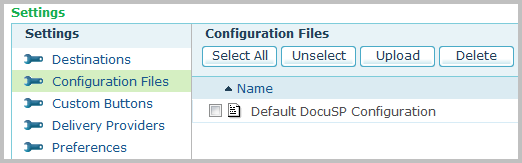
-
Click Upload.
The Upload Stub File dialog is displayed.
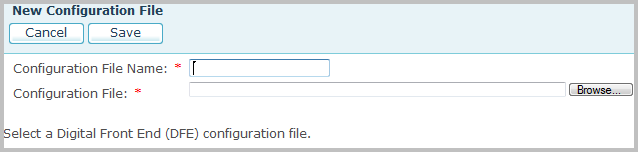
-
Browse for the configuration file and set a new name for the file. When finished, click Save. The configuration file is uploaded to uProduce server.
-
You can see a list of configuration files in the Name list of the Destination page.
For more information on creating a VI Container packed file, refer to Production and Deployment.