
 View what's in this topic
Running Maintenance Operations
Note: This operation can be performed by the system admin user only.
To maximize performance and disk space of the uProduce server, it is recommended to maintain it correctly. The following are some maintenance tasks that can be performed to ensure that your system continues to run smoothly and to help you fix any issues that may arise.
It is recommended that you back up your data bases prior to performing any of these maintenance processes.
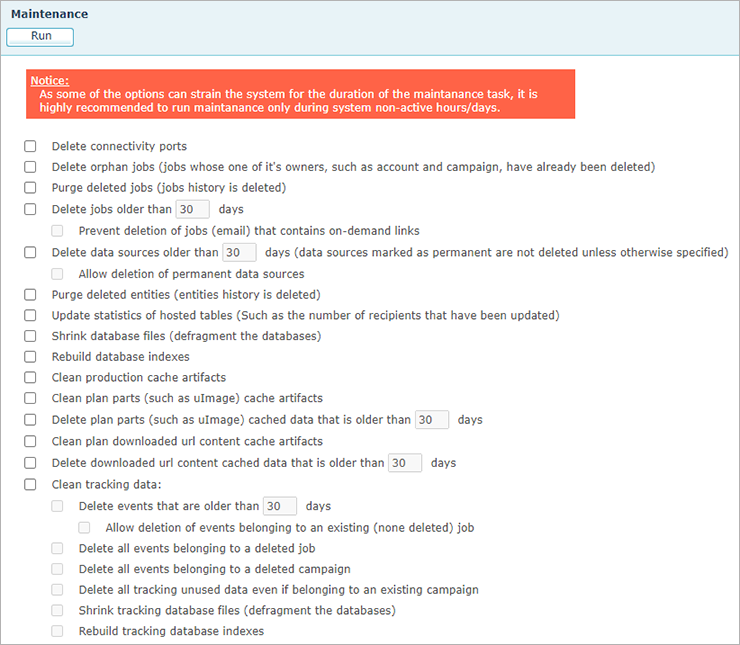
|
Option |
Description |
|---|---|
|
Delete connectivity ports |
Delete ports created automatically for each document that was opened via Connectivity. The connectivity ports will be recreated for each document that will be used. |
|
Delete orphan jobs |
Delete jobs whose owners, such as account and campaign, has been deleted. |
|
Purge deleted jobs |
Information about deleted jobs is kept in the system. This option will remove any information regarding all deleted jobs. |
|
Delete jobs older than ... days |
Delete all jobs that are older than the specified number of days. |
|
Prevent deletion of jobs (email) that contain on-demand links |
During job cleanup, refrain from removing jobs that contain on-demand links. |
|
Delete data sources older than... days |
Delete data sources older than the specified number of days. Note that data sources marked as permanent are not deleted, unless otherwise specified. |
|
Allow deletion of permanent data sources |
When this option is selected, the above option will also delete permanent data sources. |
|
Purge deleted entities |
Information about deleted system entities (account, campaign, etc.) is kept in the system. This option will remove any information regarding all deleted entities. |
|
Update statistics of hosted tables |
For cross-media campaigns, inserted and updated records are marked as such. This option collects statistical information about the number of inserted and updated records. |
|
Shrink database files |
See Shrink a database. |
|
Rebuild database indexes |
Rebuild all XMPie database indexes. |
|
Clean any production cache artifacts |
As part of the job production (particularly print jobs), some data is saved to facilitate subsequent job production. Select this option to clear this data. |
|
clean any plan parts (such as uImage) cache artifacts |
As part of generating plan parts such as uImage, the result of the plan part generation is cached. For instance, in uImage the generated file is saved in the cache. Select this option to clear the cached data. |
|
Delete plan parts (such as uImage) cached data that is older than... days |
As part of generating plan parts such as uImage, the result of the plan part generation is cached. For instance, in uImage the generated file is saved in the cache. Select this option to clear cached data which is older than the specified date. |
|
Clean any plan downloaded url content cache artifacts |
As part of downloading images via the plan relevant functionality, the downloaded images are saved in the cache to be reused later, if needed. Select this option to clear the cached data. |
|
Delete downloaded url content cached data that is older than... days |
As part of downloading images via the plan relevant functionality, the downloaded images are saved in the cache to be reused later, if needed. Select this option to clear the cached data which is older than the specified date. |
|
Clean Tracking Data |
|
|
Delete events older than... days |
Delete all events that are older than the specified number of days. |
|
Allow deletion of events belonging to an existing job |
Select to allow deletion of events belonging to and existing non-deleted job. |
|
Delete all events belonging to a deleted job |
Delete all events of a deleted job. |
|
Delete all events belonging to a deleted campaign |
Delete all events of a deleted campaign. |
|
Delete all tracking unused data even if belonging to an existing campaign |
Delete all tracking unused data even if belonging to an existing campaign. |
|
Shrink tracking database files (defragment the databases) |
See Shrink a database. |
|
Rebuild tracking database indexes |
Rebuild all tracking database indexes. |