
 View what's in this topic
Customer Expectation Document
Introduction
This document communicates customer expectations in the areas of hardware and software platform requirements, knowledge, skill and training to achieve the best experience and results with XMPie uStore.
Note: XMPie is constantly striving to improve the user experience in both Back Office and Storefront applications. In some cases, introduction of new technologies, such as new browsers or new web standards, may modify the familiar user experience. Please be aware, that when upgrading to a new version of StoreFlow, such changes in application behavior may take place.
Product description
uStore is the main component of the XMPie StoreFlow solution. StoreFlow is an all-inclusive Web-to-print solution for creating and managing online stores and marketing portals. As a solution that combines web-to-print with prepress automation, StoreFlow includes all you need to cost-effectively scale your business through the web.
StoreFlow comes in two configurations:
-
PersonalEffect StoreFlow
-
PersonalEffect StoreFlow Pro
PersonalEffect StoreFlow
PE StoreFlow is a turn-key solution for print service providers managing Web-to-print sites and marketing portals. StoreFlow merges XMPie's powerful Web-to-print capabilities with flexible pre-press automation to provide a complete, out-of-the-box solution with an end-to-end workflow for receiving, processing and producing orders received online.
Each product configuration includes a specific subset of the components below. You will receive only those components that are included in your configuration.
-
uCreate Designer for design of dynamic document templates using Adobe InDesign, where the content is driven by data and logic.
-
uCreate Print for design of dynamic document templates using Adobe InDesign, where the content is driven by data and logic. uCreate Print also has the added ability to produce a VDP output stream locally on your desktop, in case you require it for review purposes.
-
uProduce Connectivity license for working seamlessly between the uCreate plugin and the uProduce server. With this connectivity license, you will be able to edit uProduce jobs remotely from within the uCreate plugin.
-
uPlan for connecting to complex data structures and defining sophisticated business logic to drive variability.
-
uProduce server for managing templates and the production of press-ready files. The uProduce server included with StoreFlow uses the XLIM document format and composition engine developed by XMPie.
-
uStore for enabling and managing customer-facing storefronts.
-
Xerox FreeFlow Core for enabling store administrators to define multi-step workflows that preflight documents and automate prepress and production.
PersonalEffect StoreFlow Pro
In addition to the above specified PE StoreFlow configuration, the PE StoreFlow Pro configuration provides a uProduce server that uses the Adobe InDesign Server composition engine in addition to the XLIM standard, which fully leverages InDesign's advanced design capabilities. Also, it uses a more advanced FreeFlow module - FreeFlow Advanced Prepress Add-On.
Skill-set requirements
Administrating uStore requires a few different skill sets, as listed below. The degree of technical experience required is related to both design and technical complexity requirements of the uStore installation site. A good set of stores may be created with basic skill sets, but more complex storefronts will require a greater degree of these skills.
e-Commerce practices
While not a technical requirement to operate uStore, familiarity with current e-Commerce practices, and in particular, online shopping processes, shipping and payment methods, approval and user-authorization procedures, will enable you to create better visitor experiences.
Note that the success of your e-commerce website depends mainly on the amount of information it provides and how it engages visitors to interact and navigate the web pages.
Cascading Style Sheets (CSS)
Simple custom storefront design is accomplished by creating skins for each storefront. To create and maintain these skins, you need a good working knowledge of cascading style sheets (CSS). To implement advanced skin designs, you need a higher level of graphic design and web-programming skills.
XMPie knowledge
The dynamic documents presented for sale on a uStore storefront are, behind the scenes, print and e-mail documents prepared as part of an XMPie variable data print (VDP) or cross-media campaign. The complexity of documents available will depend on your knowledge of XMPie's products and features.
Customers should not expect to offer very complex documents without taking the time to build or acquire the XMPie skill-sets necessary to develop the e-mail and/or print documents behind these offerings.
XLIM
The PersonalEffect StoreFlow solution uses the XLIM composition engine, XMPie's proprietary VDP engine, and does not include an Adobe InDesign Server.
It is a mandatory requirement to understand the capabilitie sand limitations of the XLIM document composition as described in XLIM Capabilities.
HTML
HTML skills are needed to create richer shopping experience, including elements such as a branded homepage, custom-page headers and footers and so on.
Structured Query Language (SQL)
Store administrators can set events – such as customer registration or order submission – to trigger predefined actions. These actions read data from the uStore database – such as customer name or job name – and email the data to a list of recipients. The system decides which data to pull from the database through SQL defined queries. You need basic SQL skills to pull the data from the uStore database and insert it in these emails. You will need more advanced SQL skills to be able to create complex rules for pulling and sending data.
Extensible Markup Language (XML)
You need XML skills to design messages that are sent to third party systems. The level of skills required depends on the requirements of the third-party system. For most systems, at least basic XML knowledge is necessary.
Extensible Stylesheet Language (XSL)
XSL is used to format the XML into the data sent in emails generated from a trigger and job ticket created by uStore. You need basic XSL skills to format this data. You will need advanced XSL skills to be able to apply more complex requirements.
Web programming
To develop your own plug-ins and extend uStore functionality, you need to understand web programming. Integration of uStore with customer websites, through uStore Connect, requires skilled web-programming skills, preferably ASP.NET.
If you wish to enhance the look and feel of an NG store or change its behavior, you'll have to be familiar with React.JS.
Microsoft Excel
To use the Excel Pricing Engine method and modify reporting, you need to be familiar with Microsoft Excel terminology and know how to set up formulas.
Xerox FreeFlow Core
To set up prepress workflows in the Xerox FreeFlow Core application, you need to be familiar with prepress processes and workflow concepts.
The functionality available in your Xerox FreeFlow Core system depends on the license that you have. For more information, refer to the Xerox FreeFlow Core Customer Expectation Document.
JDF workflows
JDF jobs consist of a set of nodes that specify the production steps required to create the end product. To set up JDF nodes, you need to be familiar with JDF specifications and the required XML code.
StoreFlow network architecture
The following diagram describes a typical StoreFlow architecture.
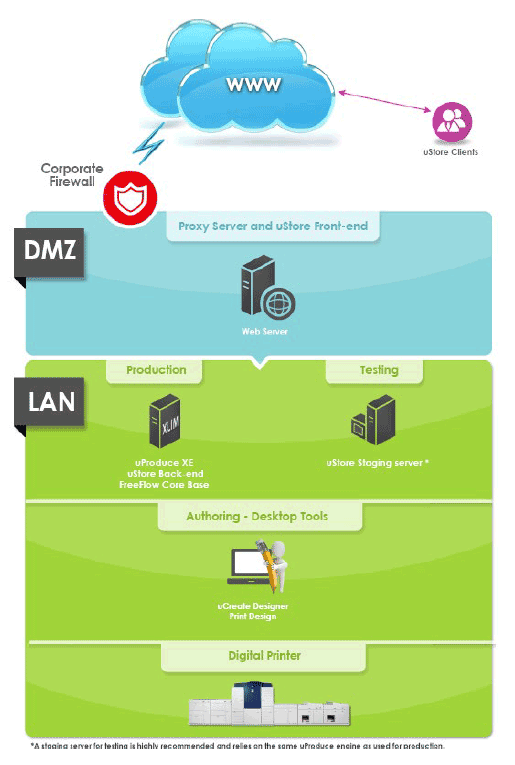
In this network architecture, uStore and uProduce are installed in the LAN and a Proxy Server resides in the DMZ. A Proxy server is used in front of an application server to add a layer of security. All connections that come from the internet to the uStore server are routed through the Proxy server.
Note: In a StoreFlow Pro configuration, uProduce XE (XLIM Edition) is replaced with uProduce IND (InDesign Composition), which includes Adobe InDesign Server. Customers must remain current on XMPie Maintenance and Support in order to continue use of the InDesign Server.
System operating ranges
|
Load Parameters |
On Premise:
|
|
Stress Parameters |
Maximum number of:
Disclaimer:
|
|
File Upload |
|
|
Composite Product |
Composite Product:
|
|
Additional Limitations |
Files under 1 GB can be transferred using FFC and FFC Cloud Print Client using HTTP streaming. |
System requirements
It is the customer's responsibility to provide sufficient resources to the system, such as free disk space, database storage and memory. Falling too low on resources might result in system slowdown, failures and unexpected behavior.
uStore can be installed on the uProduce server or on a separate Windows server. For more information about uProduce server requirements, see PersonalEffect Customer Expectations Document.
XMPie server products can be deployed on virtualized environments (VM).
Hardware and software requirements
|
Processor |
|
|
Memory |
12 GB for PersonalEffect StoreFlow |
|
Disk Storage |
Two hard drives in RAID 1 (mirroring) configuration, 1TB (SSD) each, with two partitions:
|
|
Network |
Gigabit Ethernet adapter |
|
Operating system |
|
|
SQL server |
Microsoft SQL Server 2025 |
|
Additional software |
|
|
uProduce, FreeFlow Core |
(1) For PersonalEffect StoreFlow Pro only. Adobe InDesign Server is provided by Adobe on an annual subscription basis. Customers must remain current on XMPie Maintenance and Support in order to continue use of the InDesign Server.
Proxy server requirements
|
Processor |
One physical Quad-Core Intel Xeon |
|
Memory |
8 GB RAM or more |
|
Disk Storage |
Two hard drives in RAID 1 (mirroring) configuration with two partitions:
|
|
Network |
Gigabit Ethernet adapter |
|
Operating System |
Windows Server 2025 Standard Edition |
Client browser & operating system support
Supported are the latest browser versions available at the date of release.
|
Storefront |
|
|
Back Office |
|
|
Operating System |
|
Software backup and restoration
Backing up the uStore software is the customer's responsibility. For more information, you may refer to the XMPie Server Maintenance article in the XMPie Knowledge Base.
XMPie recommends that you back up the database nightly and before any software update. Save the backup on a separate media (tape, disk, external hard drive), and do not keep it on the server itself. The media should be removed and kept at a separate, secure location.
Backups for the uStore files can be carried out using commercially available backup software. If no backup software is available, the uStore files can be copied to a safe location as a backup procedure.
Restoring a backup
System restore is usually carried out by an XMPie 3 or Tier 4 specialist. To request a system restore procedure, open a support case via the XMPie Support Portal.
Before and after an upgrade, make sure that you have a full backup of the database and the uStore folder.
Working with a staging server
It is the customer's responsibility to provide a separate and dedicated server for the staging environment. The customer is also required to provide the license for Microsoft Office as well as for the required Windows operating system. The Windows operating system must be genuine.
Setting up the staging environment involves special scripting and configuration; therefore, it should be performed by a qualified XMPie Tier 3 specialist.
The staging environment should be used for upgrading the system to a newer version. Do not create new stores in the staging environment. As the store and its products are available only after the store is placed online, you can work directly on the production server for creating the stores.
It is highly recommended that you work in a staging environment. For more information, refer to the How to upgrade uStore using a uStore staging server article in the XMPie Knowledge Base.
Support and maintenance
uStore is supported for customers under a current Support and Maintenance agreement. Support is provided by support channels for all modules purchased from XMPie, including uStore, FreeFlow Core, uImage, and uPlan among other modules. Support is available for the aforementioned software, provided they are not altered and their features are used as shipped. Support is not available for customer-modified versions. Support is available for functionality of API interfaces and functions. As a maintenance and support plan customer, you will have full access to the help desk, support team, information portals, and free product upgrades.
Note: Customers are required to provide XMPie with remote access to their system. XMPie will not be able to provide timely support if remote connection access is not available.
For recommended maintenance procedures, refer to the XMPie Server Maintenance server article in the XMPie Knowledge Base.
Plug-in connections to third parties
Support for PayPal, FedEx, USADATA, and other plug-ins that connect to third-party services is limited to ensuring that uStore or uProduce is successfully connected to the respective third-party services. XMPie does not support issues associated with the functioning of the third-party services. The customer is responsible for establishing any business accounts required to connect XMPie to third-party software.
Security and Privacy
General Data Protection Regulation (GDPR)
XMPie supports GDPR compliance within its products.
The customer, who is the data controller, must take action in order to ensure compliance.
To learn about the steps a customer must take to comply with GDPR when using XMPie products, read GDPR guidelines for XMPie products.
Security
XMPie is committed to the security of its products.
Software patches for XMPie products will be implemented within a required minimum timeframe based upon criticality of exposure, impending risk to customer system resources and data, regulatory requirements and customer contractual requirements, but not to exceed:
-
High/Critical (i.e., CVSS >=7.0) rated vulnerabilities will be remediated within 30 days
-
Medium/Low (i.e., CVSS <7.0) rated vulnerabilities will be remediated within 90 days
Security fixes provided as a patch or as a version installation must be installed as soon as they are released.
Third-party service agreement requirements
uStore enables connectivity to a variety of third-party services, such as:
-
FedEx and UPS, for shipping
-
PayPal, Authorize.net and MultiSafepay for automated credit-card clearing
-
USADATA, for online mailing list acquisition
-
LivePerson, for real-time chat engagement with store visitors
Customers may choose to implement none, any, or all of these services. It is the responsibility of the customer to acquire and maintain service level agreements with the third-party services. Customers are responsible to enable an active outbound internet connection to connect to third-party services.
Note: XMPie limits the support of third-party services to the functionality that was available at the date of the release of the XMPie system. Third-party companies may decide to expand or reduce the services they provide. XMPie may not support changes in the scope of the services offered and cannot guarantee the quality of the services provided by third-party companies.
Fault-tolerant configurations
XMPie's fault-tolerant configurations are compatible and are integrated with systems that are already built for fail-safe operation. Customers that are interested in a High Availability (HA) system with no single point of failure should have all the necessary HA infrastructure components, such as Microsoft Cluster (SQL Cluster) as well as a fail-safe central storage solution.
Before installation of the XMPie fault-tolerant system, the customer's fault-tolerant infrastructure must be already in place. It is the responsibility of the customer to purchase, install and maintain this infrastructure.
Limitations
Job ticketing
JDF (Job Definition Format) is an industry standard designed to simplify information exchange between different applications and systems in and around the Graphic Arts Industry.
XMPie has implemented JDF standards that are compatible with Xerox FreeFlow and HP SmartStream JDF conventions.
The current JDF 1.4 standard was certified in 2012.
Working with other third-party vendors may require further code development to comply with additional needs.
To view the complete list of the JDF standards supported by uStore, refer to the JDF Node page in the uStore Back Office application: Global Settings > System Setup > JDF Node.
Note: Some of the existing JDF properties may pass default values. You can edit the XML code or add new nodes on the JDF Node page.
uEdit
uEdit does not support Chinese and Japanese writing.
Time-frame from purchase to store availability
In the XMPie training course, attendees build a sample working storefront. Creation of an actual store, however, can take anywhere from a couple of weeks for a straight-forward store with minimal design work, to a couple of months for a complex store with lots of creative design. The actual time is a ratio between the required look-and-feel of the store and the skill set of the people involved in the store creation.
Training
The StoreFlow course is designed to provide introductory training on the latest version of XMPie PersonalEffect StoreFlow for people who have no previous experience with XMPie products.
The training is delivered onsite by an XMPie instructor.
At the end of the course, participants will be able to:
-
Communicate the benefits of web-to-print marketing portals
-
Create static and dynamic (variable) products
-
Create and customize online stores for different customers
-
Configure pricing, shipping, tax, and other product settings
-
Set up approval processes
-
Manage user groups and permissions for different stores
-
Manage and process online orders
-
Create reports
-
Create prepress workflows for imposition, finishing and print management
For customers who purchase the Xerox FreeFlow Core module, training will also include basic procedures on the FreeFlow Core application.
It is the customer's responsibility to acquire the required knowledge of non-XMPie products.
Extended services
XMPie provides extended services for customers whose needs exceed the operability and functionality help covered by the Support and Maintenance plan. These services are:
Professional Services include application development, programming services, color consultation, implementation services, web development and design services and more. Programming services may also include the training and support or use of the XMPie APIs. Other Professional Services work may include error resolution, workflow development and optimization for campaign and job creation.
Application Services provide XMPie customers with a tailor-made implementation strategy and service to successfully start working with their XMPie software. By using best practices within the industry, Application Services can help customers to identify where they want to go with the software and help them take their first steps. In addition, they can implement sophisticated projects, plan workflows, mark decision-points, develop custom configurations, or even supply visual and creative campaign elements.
Important: Do not upgrade your system before you verify that all special components or functionality that were developed by XMPie Professional Services comply with the new product version.
Responsibility matrix
|
|
Customer |
XMPie |
|
General |
||
|
Provide an appropriate environment for the uStore and uProduce server installation, including adequate space and appropriate temperature, humidity and power requirements. |
|
|
|
Provide and configure the network infrastructure |
✓ |
|
|
Provide and configure uStore and uProduce server third-party application software |
✓ |
|
|
Install the StoreFlow software and ensure operability |
|
✓ |
|
Connect uStore and uProduce to the network, and ensure connectivity |
✓ |
✓ |
|
Define initial workflow model |
✓ |
|
|
Perform software upgrades |
✓ |
✓ |
|
Use HTTPS to secure stores |
✓ |
|
|
Ensure the domain is not flagged as malicious* |
✓ |
|
|
Pre-installation planning |
||
|
Identify customer implementation team |
✓ |
|
|
Identify XMPie implementation team |
|
✓ |
|
Determine space requirements |
✓ |
✓ |
|
Determine network requirements |
|
✓ |
|
Site preparation |
✓ |
|
|
Make necessary site modification as needed |
✓ |
|
|
Site inspection |
|
✓ |
|
System installation |
||
|
Provide remote access (RDC) to system |
✓ |
|
|
Install XMPie modules |
|
✓ |
|
Configure XMPie modules |
✓ |
✓ |
|
Verify system operation |
✓ |
✓ |
|
Test connectivity |
|
✓ |
|
Training |
||
|
Confirm training groups |
✓ |
✓ |
|
Develop detailed training plan |
✓ |
✓ |
|
Perform initial training for XMPie customer |
|
✓ |
|
Schedule and perform standard training for each group |
✓ |
✓ |
|
Schedule and perform any customized training identified |
✓ |
✓ |
* Customers are solely responsible for ensuring the data they host on the site does not trigger malicious content flags. This responsibility is continuous and ongoing, extending beyond the initial configuration of a store/domain. Should their store/domain become flagged as malicious weeks or months after setup, the onus remains on the customer to actively monitor their data and take appropriate remedial action.
If a customer's domain triggers a malicious content flag, XMPie may need to take temporary measures to mitigate the risk, potentially including taking the store(s) offline. This action would be taken solely to protect the platform and its users and would be communicated to the customer beforehand.