
 View what's in this topic
Clearing Plugin Pair Table
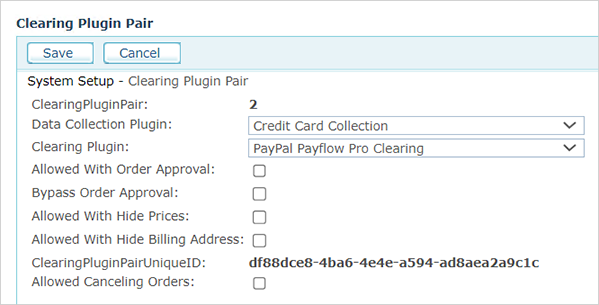
The Clearing Plugin Pair page defines how payment methods behave across the system. Each row in this table represents a pairing of two plugins that work together to process a payment:
-
A Data Collection Plugin: Controls how payment information is collected from the shopper (for example, a credit card form or a redirect to an external payment page).
-
A Clearing Plugin: Controls how the payment is processed (for example, charging a credit card through a payment gateway, or recording a manual payment).
Together, these two plugins form a clearing method that can be assigned to stores. The checkboxes on each row control how that clearing method interacts with other system features.
To access the Clearing Plugin Pair table, go to Global Settings > System Setup > Clearing Plugin Pair.
Fields
|
Field |
Description |
|
Data Collection Plugin |
The plugin responsible for collecting payment information from the shopper during checkout. Examples include credit card entry forms, PayPal redirects, and hosted payment pages. |
|
Clearing Plugin |
The plugin responsible for processing the payment with the payment provider. Examples include gateway-specific processors (such as Authorize.NET, Moneris, or Worldline) and "No Clearing" for cases where payment is handled externally. |
|
Allowed With Order Approval |
Controls whether this clearing method can be assigned to stores that have order approval turned on. When a store has order approval enabled, only clearing methods with this option checked will appear as available options in the store's Clearing tab. Clearing methods without this option will be hidden to prevent configuration errors. Important: This flag controls admin-side visibility only. The order approval workflow is fully supported only with non-redirect clearing methods (such as "No Clearing" or invoice-type payments). Redirect-based clearing methods (such as PayPal or Worldline), which send the shopper to an external payment page, will complete the order immediately upon return from the payment gateway, bypassing the approval queue regardless of this setting. See Known limitation for details. |
|
Bypass Order Approval |
Intended to allow orders placed with this clearing method to skip the approval workflow, even if the store has order approval turned on. Important: This flag is only effective for non-redirect clearing methods. For redirect-based clearing methods (such as PayPal or Worldline), orders always bypass the approval queue upon return from the external payment gateway, regardless of this setting. See Known limitation for details. |
|
Allowed With Hide Prices |
When enabled, this clearing method can be used in stores where product prices are hidden from shoppers. Some clearing methods require price information to be visible during checkout. If this option is not checked, the clearing method will not be available in stores configured to hide prices. |
|
Allowed With Hide Billing Address |
When enabled, this clearing method can be used in stores where the billing address is not collected during checkout. Some payment processors require a billing address for fraud verification. If this option is not checked, the clearing method will not be available in stores configured to hide the billing address. |
|
Allowed Canceling Orders |
When enabled, orders placed using this clearing method can be cancelled or edited after submission. Some payment methods process charges immediately and do not support reversals. If this option is not checked, the cancel and edit order features will not be available for orders placed with this clearing method. |
How it works
When a store administrator configures clearing options for a store (in Store Setup > Clearing tab), the system checks the flags on each clearing plugin pair to determine which clearing methods are available. Clearing methods that are incompatible with the store's settings are automatically hidden.
For example, if a store has order approval enabled, only clearing methods marked as "Allowed With Order Approval" will appear in the store's clearing options. Similarly, if a store hides prices or the billing address, only compatible clearing methods will be shown.
Note: Changes to these settings affect all stores that use the modified clearing method. Before changing a flag, verify which stores are currently using the clearing method to avoid unintended side effects.
Tip: If you are setting up order approval for a store and the approval page shows a warning about incompatible clearing options, check this table to enable "Allowed With Order Approval" for the relevant clearing method, or switch the store to a compatible clearing method.
Known limitation
The order approval workflow is only fully supported with non-redirect clearing methods - clearing methods where the payment is processed without sending the shopper to an external payment page. Examples include "No Clearing" and invoice-type payment methods.
Redirect-based clearing methods (such as PayPal and Worldline) send the shopper to an external payment page to complete the transaction. When the shopper returns from the external payment page, the system finalizes the order and moves it directly to the fulfillment queue, bypassing the approval workflow entirely. This happens regardless of the "Allowed With Order Approval" and "Bypass Order Approval" settings.
If your store requires order approval, use a non-redirect clearing method.