
 View what's in this topic
XES subscription
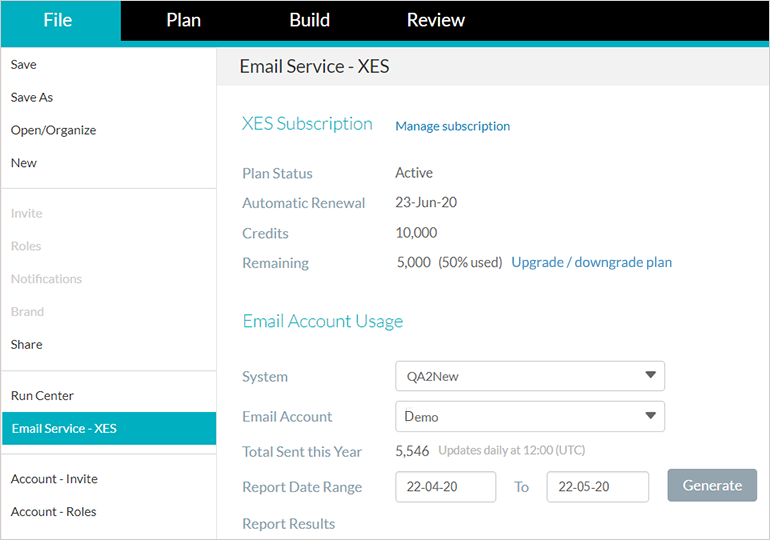
The Email Service - XES page provides you an overall view of the status of your XES subscription, email usage, and reporting.
To access this page, go to Account > Email Service - XES and click the Subscriptions tab.
XES Subscription
The XES Subscription area includes:
-
Automatic Renewal — The date on which the subscription will be automatically renewed, and the date on which it started.
-
Monthly Credits — The number of credits at your disposal.
-
Status — The current plan status (for example, Active). If there is a problem with the payment, the subscription will be suspended and the service will be automatically stopped.
-
XES customer FAQ — A link to the XES customer FAQ page.
-
Manage subscription — Click to go to the XES store to manage your subscription or purchase additional credits.
Email Usage
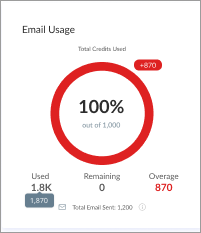
The Email Usage area displays a chart showing how many credits have been used out of your total allocation. It includes:
-
Used — The number of credits consumed.
-
Remaining — The number of credits still available.
-
Overage — The number of emails sent beyond your allocation, if you have exceeded your quota. The chart turns red to indicate overage.
-
Total Email Sent — The number of emails sent by the selected account, displayed below the chart.
Overage
If you've exceeded the number of emails allowed by your subscription, the Overage value shows the number of emails that have exceeded the quota, and the chart turns red.
Email Usage Report
The Email Usage Report area allows you to generate a detailed report of emails sent for a specific time range. Select a From and To date, and click Download Detailed Report to receive a monthly breakdown for the specified time range.
Note: The system is updated daily at 00:00 (GMT), so today's data will not be included in this report.