
 View what's in this topic
XES Identity Management
The Identity management tab in the Email Service - XES settings allows you to manage your email sender identities. You can add and verify domain and email identities, view DNS records, configure a Custom Mail From domain, and track the verification status of each identity.
To access identity management, go to Account > Email Service - XES and click the Identity management tab.
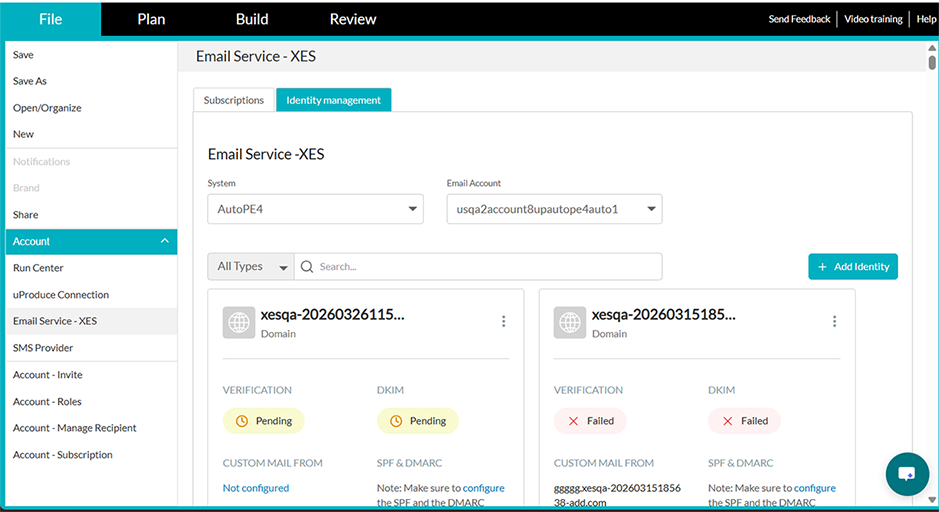
From this tab you can:
-
Add Identity — Add domain or email identities. Domain identities allow sending from any address within the domain; email identities verify a single address.
-
View verification statuses — Track whether each identity is Pending, Verified, or Failed. Domain identities also show DKIM, Custom Mail From, and SPF & DMARC statuses.
-
View DNS records — For domain identities, view and copy the DKIM, DMARC, and SPF records, or download them as CSV.
-
Configure Custom Mail From — Set up a custom MAIL FROM subdomain for domain identities.
-
Filter and search — Filter identities by type (Domain or Email) or by status (Verified or Unverified), and search by name.
For detailed instructions on managing identities, including step-by-step procedures for adding domains, adding emails, configuring Custom Mail From, and understanding DNS records, see Email Reputation and Deliverability in the XES help.