
 View what's in this topic
PDF/VT Recipient Attributes
The PDF/VT Recipient Attributes section lets you embed structured recipient information — for example, names, addresses, phone numbers, or tracking IDs — into each record of a PDF/VT output file. The values are written as standard CIP4 metadata in the PDF/VT document part metadata (DPM) of each recipient, where they can be read by downstream RIPs or referenced as tokens in post-composition operation file names.
This section appears on the Process page only when the output format is PDF/VT-1 or PDF/VT-3.
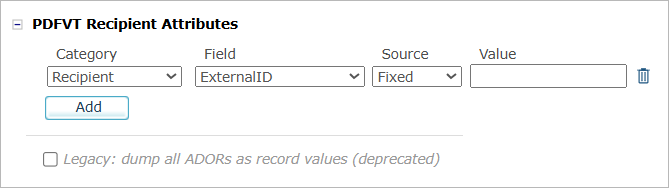
Add a recipient attribute
Each row in the section defines one attribute. To add a row, click Add, then set its four columns:
-
Category: Choose the kind of recipient information you are providing. The category determines where the value is stored in the CIP4 structure and which fields are available in the next column. See Categories for the full list.
-
Field: Choose the specific attribute within the category. For standard categories, this is a drop-down of CIP4 fields (for example, FirstName, City, Phone). For Custom and CIP4 Custom, type a free-form path instead — use slashes to nest sub-keys (for example, Tracking/BatchID).
-
Source: Choose how the value is supplied:
-
Fixed — the same constant text for every recipient.
-
ADOR — resolved per recipient from a text ADOR in the plan.
-
-
Value: If Source is Fixed, type the constant text. If Source is ADOR, select the ADOR object from the drop-down.
To remove a row, click the trash icon at the end of the row.
Note: Each Category / Field combination must be unique within the section. The same attribute cannot be defined twice.
Categories
The category controls where the value lands in the CIP4 recipient structure. Standard categories expose a fixed list of fields drawn from the CIP4 specification; Custom and CIP4 Custom let you supply your own paths.
|
Category |
Description and available fields |
|---|---|
|
Recipient |
A top-level identifier for the recipient. Fields: ExternalID |
|
Contact |
A descriptive name or contact-type tag for the recipient. Fields: DescriptiveName, ContactTypes |
|
Person |
Personal-name parts. Fields: FirstName, LastName, FamilyName, FullName, NamePrefix, NameSuffix, AdditionalNames, JobTitle |
|
Company |
Organizational affiliation. Fields: OrganizationName, OrganizationalUnit |
|
Address |
Mailing-address parts. Fields: AddressUsage, AddressLines, City, CivicNumber, Country, CountryCode, PostalCode, PostBox, Region, Street, StreetName |
|
ComChannel |
Communication channels for the recipient. Add one row per channel; in the output, each row becomes one entry in an ordered list of channels. Fields: Phone, Email, Fax, Mobile, WWW |
|
CIP4 Custom |
A free-form attribute stored under the recipient’s CIP4 subtree. Type a path in the Field column — use slashes to nest sub-keys (for example, Tracking/BatchID). Use this when you need a CIP4 extension that is not in the standard categories above. |
|
Custom |
A free-form attribute stored outside the CIP4 subtree, at the document part metadata root. Type a path in the Field column — use slashes to nest sub-keys (for example, XMPie/UserField). Use this for non-CIP4 metadata that should still travel with each recipient. |
Legacy compatibility
The Legacy: dump all ADORs as record values (deprecated) checkbox at the bottom of the section preserves the older behavior in which every readable ADOR in the plan was written into each recipient’s metadata as a flat key-value list. When the checkbox is selected, this flat list is added alongside any structured attributes you have configured above.
Leave the checkbox cleared unless you have a downstream consumer that depends on the older format. The structured attributes in the table above are the recommended way to expose recipient information in PDF/VT output.