
 View what's in this topic
Output Naming Tokens
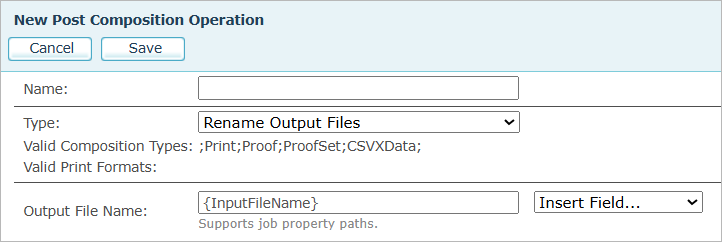
Output naming tokens are placeholders that you embed in a file-name or copy-count expression to inject values from the running job. They are used in these fields of post composition operations:
-
Output File Name in the Rename Output Files operation.
-
File Name in the Split Output by Recipients and Partition Output operations.
-
Copies in the Duplicate Output Pages operation, which accepts a single token instead of an expression.
Many of the common tokens are also available from the Insert Field drop-down next to each of these fields.
Token syntax
An expression is plain text mixed with tokens. Each token is enclosed in curly braces. Anything outside the braces is taken as literal text. A token can include an optional format specifier after a colon, used for padding numbers or formatting dates.
|
Shape |
Meaning |
|---|---|
|
{Name} |
Insert the named value as-is. |
|
{Name:format} |
Insert the named value using a format specifier. For numbers, use leading zeros (for example, {Index:0000} produces 0001, 0002). For dates and times, use a .NET-style date format (for example, {CurrentDate:yyyy-MM-dd}). Without a format specifier, {CurrentDate} produces yyyy-MM-dd HH-mm-ss. |
For example, the expression {InputFileName}_{Index:0000} applied to an input file named mailing.pdf produces output files mailing_0001.pdf, mailing_0002.pdf, and so on.
Characters that are not valid in a file name (\ / : * ? " < > |) are replaced with an underscore. The original file extension is preserved automatically.
A token that cannot be resolved — an unknown path, a metadata value that is missing for this recipient, or a token that the operation does not support — produces an empty string. No error is raised, and any literal text around the token is left as typed, which can leave a stray separator in the name (for example, mailing_.pdf).
In Split Output by Recipients, if the resolved name already exists in the output folder, (#<part number>) is appended before the extension — for example, John_Smith (#5).pdf. This keeps recipients who share the same name in separate files.
In Rename Output Files, collisions are handled differently: when several files in the same job resolve to the same name, every one of them gets a sequence number appended before the extension — _1, _2, and so on, zero-padded to the number of files involved.
Which operations support which tokens
Not every token works in every operation:
-
Split Output by Recipients and Partition Output support all of the tokens described on this page, including {Index} and {DPM:…}, because they work at the recipient or page level.
-
Rename Output Files works at the file level: it produces one output file per input file, and it has no recipient or page context. It therefore supports neither {Index} nor {DPM:…} — both resolve to an empty string.
-
Duplicate Output Pages does not build file names at all; it keeps the source file name. Its Copies field accepts a single constant, job property path, or {DPM:…} path.
Tokens from the Insert Field dropdown
The Insert Field dropdown lists the most commonly used tokens, grouped under Common, Job, and IDs. Picking an entry inserts the token at the cursor position, with a default format already applied for numbers and dates. You can adjust the format afterwards, or type any token directly into the field instead of using the drop-down.
The list below reflects the entries available in the Rename Output Files operation. The Split Output by Recipients and Partition Output operations add a few extras (see Operation-specific entries). The Duplicate Output Pages operation lists only a few, because its Copies field accepts a single value rather than an expression.
Most of the drop-down labels are self-explanatory — for example, Account Name, Submit Date, or Campaign Name. A few entries are less obvious; the table below covers them.
Notes on specific entries
|
Drop-down entry |
What to know |
|---|---|
|
Job ID vs. Job GUID |
Job ID inserts {JobId:0000000000} — the numeric job ID padded with leading zeros to ten digits. Job GUID inserts {Id} — the job's globally unique identifier (a hex string), used when a numeric ID is not unique enough. |
|
Output Format |
Resolves to the internal format code rather than the display name — for example, PDFVT3, not PDF/VT-3. |
|
Job Type |
Resolves to the internal type code — for example, Print or Proof. |
|
Data Source Name |
Resolves to the name of the first recipients data source on the job ticket. If the campaign uses more than one data source, only the first one is used. |
|
Job Metadata Value (Split, Partition) |
Inserts {Ticket.Job.Metadata.Values.} with a trailing dot. Type the metadata key name immediately after the dot — for example, {Ticket.Job.Metadata.Values.Theme}. |
|
Part Index (Split) / Partition Index (Partition) |
Two labels for the same token: both insert {Index:000000}, the 1-based sequence number of the output file padded with leading zeros to six digits. |
Operation-specific entries
In Split Output by Recipients and Partition Output, the Common group also includes:
-
Part Index (Split) or Partition Index (Partition) — inserts {Index:000000}. The 1-based sequence number of the output file, padded with leading zeros to six digits.
-
Job Metadata Value — inserts {Ticket.Job.Metadata.Values.} as a starting point; type the metadata key name after the final dot.
The same two operations also list DPM Field at the bottom of the drop-down — see PDF/VT document part metadata (DPM).
In Split Output by Recipients and Partition Output, the second group of items is labeled Job Details rather than Job, and the Job Comments entry from Rename appears simply as Comments. The inserted tokens are the same, apart from the date format applied to Submit Date and Start Date: Split and Partition insert {SubmitDate:yyyy-MM-dd}, while Rename inserts {SubmitDate:yyyyMMdd}. You can change the format in either case.
The Duplicate Output Pages operation uses a different drop-down structure, because its Copies field takes a single value rather than an expression. The drop-down groups its entries as follows:
-
Constant — pre-filled values 1 and 2, for the common case of a fixed copy count.
-
Job Property — Metadata value "Copies", which inserts Ticket.Job.Metadata.Values.Copies (no braces, because the field is a single value).
-
DPM (PDF/VT) — DPM Field, which inserts {DPM:} for per-recipient copy counts read from the PDF/VT document part metadata.
Other job properties
The Insert Field drop-down covers the most common values. For anything else, type the token directly into the field. Any token name that is not in the drop-down, and does not start with DPM: or Ticket., is read as a dot-path into the job's information. Each segment in the path is a field name; nested fields are joined with dots, and array elements use square brackets.
Discover all available job paths
To see every reachable field for a particular kind of job, submit a test job and inspect the job's JSON representation:
-
Submit a test job and let it complete.
-
In the Job Center, click the job's name in the jobs list. The Job Details pane at the bottom of the page shows the job's details.
-
In the Export section at the bottom of the pane, click Download JSON.
-
Open the downloaded file. Every field name (and every nested field, joined by dots) is a valid path you can use in an expression.
For example, if the JSON contains "Account": { "Name": "Acme Inc", "FriendlyId": 7 }, both {Account.Name} and {Account.FriendlyId} can be used.
The Export section also offers Download XML, which contains the same job information in XML form. This is the same data that the Create Job Definition File (JDF) operation feeds to its XSLT, so the XML file doubles as a reference for what is available to a JDF template.
{GeneratedPageCount} and {ClickCharge} resolve to the values produced so far in the current production run, rather than the values stored on the job record, which are not final until production ends.
Submitted ticket data
The job ticket the job was submitted with — including any custom job metadata sent with the ticket — lives under Ticket. in the job's JSON. Use the path as it appears in the JSON.
For example, if the ticket included a Metadata.Values.Theme entry with the value Spring2026, then the token {Ticket.Job.Metadata.Values.Theme} resolves to Spring2026.
Important: always start ticket-side paths with Ticket. The shorter form {Metadata.Values.Theme} does not resolve, because Metadata is not a top-level field on the job.
The Copies field of Duplicate Output Pages accepts a single value rather than an expression, so the path is written without braces — for example, Ticket.Job.Metadata.Values.Copies.
PDF/VT document part metadata (DPM)
For PDF/VT output, the {DPM:path} token reads per-record or per-page values from the document part metadata structure of the PDF/VT file. The values come from two places:
-
Record-level metadata — configured on the production page in the PDF/VT Recipient Attributes section. Each entry maps to a key in the recipient's CIP4 structure.
-
Page-level metadata — configured per spread in uCreate as page directives. Each directive maps to a key in the page's CIP4 structure.
Path syntax
The path is a sequence of keys joined with slashes — for example, {DPM:Root/Recipient/Contact/Person/FirstName}. For array entries, append [N] to the segment — for example, {DPM:Root/Recipient/Contact/ComChannel[0]/Locator} reads the locator of the first communication channel configured for the recipient.
To keep paths readable, the resolver accepts several conveniences:
-
Drop the CIP4_ prefix. Write Root/Recipient/Contact/Person/FirstName, not CIP4_Root/CIP4_Recipient/CIP4_Contact/CIP4_Person/CIP4_FirstName. The resolver auto-prepends CIP4_ to each segment.
-
Absolute or relative paths both work. The full path Root/Recipient/Contact/Person/FirstName and the shorter Contact/Person/FirstName resolve to the same value. A relative record-level path is resolved from Root/Recipient, and a relative page-level path from Root/Intent — so both Root/Intent/MediaIntent/MediaType and MediaIntent/MediaType work.
-
The container keys in between are not optional. The relative form supplies only Root/Recipient or Root/Intent. It does not search the metadata for a field name at an arbitrary depth, so a field that sits inside a container must name that container. For example, the Address field Region is reached as {DPM:Contact/Address/Region} (or the full {DPM:Root/Recipient/Contact/Address/Region}), never as {DPM:Region}. A bare field name works only for the few fields stored directly under the base — for example {DPM:ExternalID} at record level and {DPM:ProductType} at page level. Use the tables below to find the shortest path that works for each field.
-
Custom values use the literal path you configured. A recipient attribute with Category Custom and Field XMPie/UserField is reached as {DPM:XMPie/UserField}.
-
CIP4 Custom values use only the suffix you configured. A recipient attribute with Category CIP4 Custom and Field Tracking/BatchID is reached as {DPM:Tracking/BatchID}.
How the value is found
The DPM lookup tries record-level metadata first and falls back to page-level metadata. If the same path exists in both, the record-level value wins. If the path is not found in either, an empty string is used.
Operations that work on recipient boundaries — Split by Recipients, Partition, and Duplicate in Recipients or Pages mode — use each recipient's record-level metadata first, then fall back to that recipient's first page. Split by Pages per Recipient works on pages rather than recipients, and reads only the page-level metadata.
DPM paths for recipient attributes (record level)
The table below covers every attribute you can configure in the PDF/VT Recipient Attributes section, and gives the shortest token that resolves for each one. You can always use the full Root/Recipient/... form instead — both resolve to the same value.
|
Category / Field |
Token |
|---|---|
|
Recipient / ExternalID |
{DPM:ExternalID} |
|
Contact / DescriptiveName |
{DPM:Contact/DescriptiveName} |
|
Contact / ContactTypes |
{DPM:Contact/ContactTypes} |
|
Person / FirstName |
{DPM:Contact/Person/FirstName} |
|
Person / LastName |
{DPM:Contact/Person/LastName} |
|
Person / FamilyName |
{DPM:Contact/Person/FamilyName} |
|
Person / FullName |
{DPM:Contact/Person/FullName} |
|
Person / NamePrefix |
{DPM:Contact/Person/NamePrefix} |
|
Person / NameSuffix |
{DPM:Contact/Person/NameSuffix} |
|
Person / AdditionalNames |
{DPM:Contact/Person/AdditionalNames} |
|
Person / JobTitle |
{DPM:Contact/Person/JobTitle} |
|
Company / OrganizationName |
{DPM:Contact/Company/OrganizationName} |
|
Company / OrganizationalUnit |
{DPM:Contact/Company/OrganizationalUnit} |
|
Address / AddressUsage |
{DPM:Contact/Address/AddressUsage} |
|
Address / AddressLines |
{DPM:Contact/Address/AddressLines} |
|
Address / City |
{DPM:Contact/Address/City} |
|
Address / CivicNumber |
{DPM:Contact/Address/CivicNumber} |
|
Address / Country |
{DPM:Contact/Address/Country} |
|
Address / CountryCode |
{DPM:Contact/Address/CountryCode} |
|
Address / PostalCode |
{DPM:Contact/Address/PostalCode} |
|
Address / PostBox |
{DPM:Contact/Address/PostBox} |
|
Address / Region |
{DPM:Contact/Address/Region} |
|
Address / Street |
{DPM:Contact/Address/Street} |
|
Address / StreetName |
{DPM:Contact/Address/StreetName} |
|
ComChannel / Phone, Email, Fax, Mobile, WWW (see the note below the table) |
{DPM:Contact/ComChannel[0]/Locator} |
|
CIP4 Custom (path = Tracking/BatchID) |
{DPM:Tracking/BatchID} |
|
Custom (path = XMPie/UserField) |
{DPM:XMPie/UserField} |
About ComChannel. Communication channels are stored as an array, in the order you added them in the PDF/VT Recipient Attributes list, and there is no lookup by channel type. Address a channel by its position, starting at 0. For each channel, Locator holds the value (the phone number, email address, and so on) and ChannelType holds its kind. For example, if you added a Phone channel first and an Email channel second, {DPM:Contact/ComChannel[0]/Locator} returns the phone number and {DPM:Contact/ComChannel[1]/Locator} returns the email address, while {DPM:Contact/ComChannel[1]/ChannelType} returns Email.
DPM paths for page directives (page level)
The table below covers the page directives set per spread in uCreate. A relative page-level path is resolved from Root/Intent, so most directives are reached by category and field name.
|
Category / Field |
Token |
|---|---|
|
Intent / ProductType |
{DPM:ProductType} |
|
MediaIntent / BackCoating |
{DPM:MediaIntent/BackCoating} |
|
MediaIntent / Coating |
{DPM:MediaIntent/Coating} |
|
MediaIntent / FrontCoating |
{DPM:MediaIntent/FrontCoating} |
|
MediaIntent / Grade |
{DPM:MediaIntent/Grade} |
|
MediaIntent / ISOPaperSubstrate |
{DPM:MediaIntent/ISOPaperSubstrate} |
|
MediaIntent / LABColorValue |
{DPM:MediaIntent/LABColorValue} |
|
MediaIntent / MediaColor |
{DPM:MediaIntent/MediaColor} |
|
MediaIntent / MediaColorDetails |
{DPM:MediaIntent/MediaColorDetails} |
|
MediaIntent / MediaQuality |
{DPM:MediaIntent/MediaQuality} |
|
MediaIntent / MediaType |
{DPM:MediaIntent/MediaType} |
|
MediaIntent / MediaTypeDetails |
{DPM:MediaIntent/MediaTypeDetails} |
|
MediaIntent / Opacity |
{DPM:MediaIntent/Opacity} |
|
MediaIntent / Texture |
{DPM:MediaIntent/Texture} |
|
MediaIntent / Thickness |
{DPM:MediaIntent/Thickness} |
|
MediaIntent / Weight |
{DPM:MediaIntent/Weight} |
|
LayoutIntent / Sides |
{DPM:LayoutIntent/Sides} |
|
LayoutIntent / SpreadType |
{DPM:LayoutIntent/SpreadType} |
|
LayoutIntent / FinishedDimensions |
{DPM:LayoutIntent/FinishedDimensions} |
|
ProductionIntent / PrintPreference |
{DPM:ProductionIntent/PrintPreference} |
|
ProductionIntent / PrintProcess |
{DPM:ProductionIntent/PrintProcess} |
|
BindingIntent / BindingSide |
{DPM:BindingIntent/BindingSide} |
|
BindingIntent / BindingType |
{DPM:BindingIntent/BindingType} |
|
Stitching / StitchNumber (see the note below the table) |
{DPM:BindingIntent/SaddleStitching/StitchNumber} or {DPM:BindingIntent/SideStitching/StitchNumber} |
|
ColorIntent / Coatings |
{DPM:ColorIntent/Coatings} |
|
FoldingIntent / FoldCatalog |
{DPM:FoldingIntent/FoldCatalog} |
|
FoldingIntent / Orientation |
{DPM:FoldingIntent/Orientation} |
|
HolePattern / HoleReferenceEdge |
{DPM:HoleMakingIntent/HolePattern[0]/HoleReferenceEdge} |
|
HolePattern / Pattern |
{DPM:HoleMakingIntent/HolePattern[0]/Pattern} |
|
Production / CopyCount |
{DPM:Root/Production/CopyCount} |
About Production directives. Production is stored alongside Intent rather than inside it, so the relative form does not reach it. Write the full path, as shown in the table: {DPM:Root/Production/CopyCount}.
About Stitching. Although the category in uCreate is called Stitching, StitchNumber is written under BindingIntent, inside either SaddleStitching or SideStitching. Which one is used depends on the BindingType value of the same spread: a BindingType of SideStitch writes SideStitching; any other value, including SaddleStitch or no value at all, writes SaddleStitching. Use the token that matches the job.
About HolePattern. HolePattern is an array with a single entry, so the index is always [0].
The values of LABColorValue, FinishedDimensions, PrintProcess and Coatings are written exactly as you configured them; the token returns that value as text.
Page directives also support the CIP4 Custom and Custom categories. As at record level, a CIP4 Custom field is reached by the path you configured (resolved under Root/Intent), and a Custom field by the path you configured at the top of the metadata structure.
Examples
Name each split file by the recipient's name
Configure PDF/VT Recipient Attributes for the job:
-
Category Person, Field FirstName, sourced from the ADOR FIRST_NAME.
-
Category Person, Field LastName, sourced from the ADOR LAST_NAME.
In the File Name field of a Split by Recipients operation:
{InputFileName}_{DPM:Contact/Person/FirstName}_{DPM:Contact/Person/LastName}
Produces files like mailing_Noma_Floom.pdf and mailing_Zeev_Cohen.pdf.
Name each partition by account and date
In the File Name field of a Partition operation:
{Account.Name}_{CurrentDate:yyyyMMdd}_partition_{Index:00}
Produces files like Acme_20260503_partition_01.pdf and Acme_20260503_partition_02.pdf.
Per-recipient number of copies
Configure a PDF/VT Recipient Attribute with Category Custom, Field Copies, sourced from the ADOR COPY_COUNT.
In the Copies field of a Duplicate Output Pages operation, with Mode set to Recipients:
{DPM:Copies}
Each recipient is duplicated according to that recipient's COPY_COUNT value. A value of 0 omits the recipient from the output.
A {DPM:…} value in the Copies field has two requirements: the input must be PDF/VT, and Mode must be set to Recipients or Pages. In Document mode the operation fails with the error "DPM copies requires Recipients or Pages mode".
The Copies field is the one place where an unresolved value is an error. Everywhere else on this page, a value that cannot be resolved becomes an empty string and production continues. In the Copies field, a value that is missing, not a number, or negative stops the operation and fails the job, naming the recipient it stopped on. Only 0 is treated as a valid instruction, meaning "skip this recipient".
Number of copies from the job ticket
When the submitting application includes a metadata value on the job ticket — for example, Job.Metadata.Values.Copies = "3" — set the Copies field of Duplicate Output Pages to:
Ticket.Job.Metadata.Values.Copies
The Copies field accepts a single value rather than an expression, so the path is written without braces.