
 View what's in this topic
Creating a Worldline Clearing Model
In order to create a Worldline clearing model, you must first set up an account in Worldline, and then configure Worldline in uStore.
Set up a Worldline account
-
Open a clearing account in worldline.com.
-
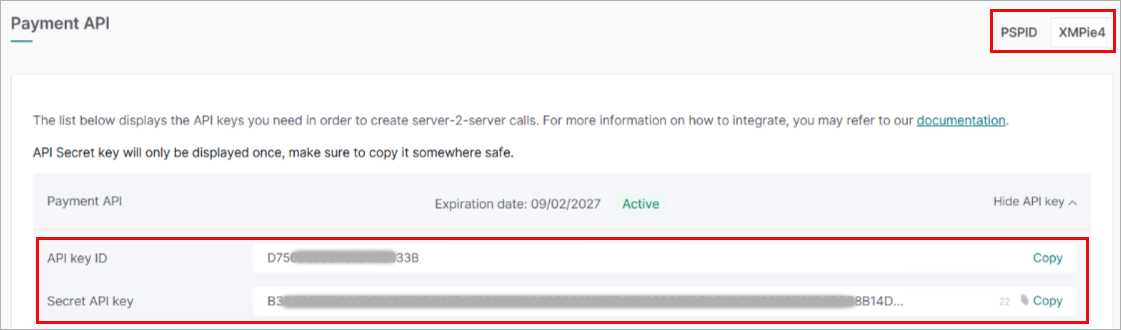
In the Developer > Payment API page, click the Add API key button, and then copy the API key ID, Secret key and PSPID (Merchant ID) which will be used when configuring the clearing model in uStore.
Note: If you wish to use a currency which is not available out-of-the-box, contact Worldline Support.
Configure Worldline in uStore
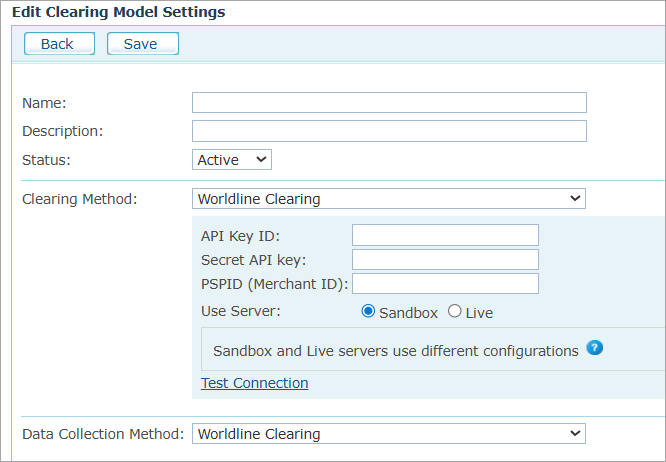
Prior to configuring the clearing model, make sure you have an active Worldline account.
|
Field |
Description |
|
Name, Description |
Enter a name and a description for the clearing model. |
|
Status |
Select Active to make the clearing model available for the stores or Inactive to hide it. |
|
Clearing Method |
Select Worldline Clearing. |
|
API Key ID |
Provided when opening your Worldline account. |
|
Secret API Key |
Provided when opening your Worldline account. |
|
PSPID (Merchant ID) |
Your merchant ID in Worldline. |
|
User Server |
Select Live to use the production server. Select Sandbox to use the test server. |
|
Data Collection Method |
Select Worldline Clearing. |