
 View what's in this topic
Previewing a Store
uStore lets administrators preview a store in the storefront application, either as themselves or as another user. Previewing is useful for verifying how the store is set up, trying out the customer workflow, and troubleshooting issues reported by individual users.
When you preview a store as yourself, uStore logs you into the storefront with your administrator credentials. You can go through the ordering process exactly as a customer would, and even process an order.
When you preview a store as another user, uStore shows you what the store looks like to that user. This is useful for checking user permissions — for example, confirming that users see only the products that are available to their user group — or for troubleshooting when a user reports that a specific product is missing.
You can preview a store from the Store list page or from an individual store page.
-
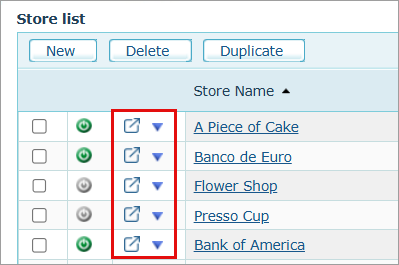
To preview a store from the Store list page: In the Preview column, click the preview icon
 next to the store. The store opens in a new browser tab, in desktop view.
-
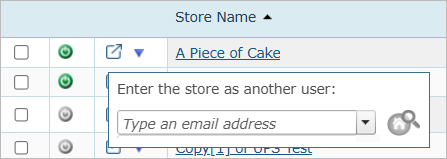
To preview a store as another user from the Store list page: Click the dropdown arrow in the Preview column to open the popup, and type the user’s email.
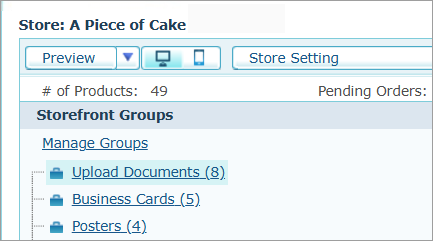
You can also preview a store from the store page, using the Preview button at the top.
-
To preview a store from the store page: Next to the Preview button, click the desktop or mobile icon
 to select whether to preview your store in desktop or mobile mode, and then click Preview.
-
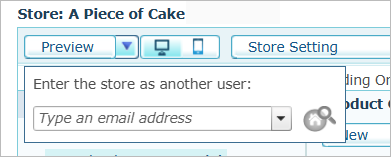
To preview a store as another user from the store page: Click the dropdown arrow next to the Preview button to open the popup, and type the user’s email.
Notes:
-
Previewing a store as another user requires the Preview Stores on Behalf of Other User permission. By default, this permission is allowed for the Superuser Root group and denied for all other groups. To grant it to other user groups, see Assigning Permissions to the User Group.
-
As you type, the email dropdown lists only users who are allowed to the selected store.
-
If the typed user is not allowed to the selected store, the Preview icon is disabled.