
 View what's in this topic
Working with data sources
A data source contains all the recipient data required for your project. Recipient data can be uploaded to reside locally in the system or it can reside remotely in an external database.
A Circle project can include multiple data sources.
A data source can contain more than one table. A single table, designated the recipient table, contains the primary recipient data. Primary recipient data typically includes personal details, such as first name, last name and email address.
The recipient table column headers must match or be mapped to the recipient schema in the plan file.
Other tables in the data source can contain supplementary data, for example, details about customer orders and bank details.
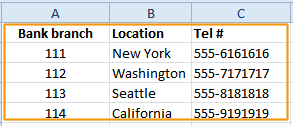
Primary data from the recipient table can reference the supplementary data to retrieve information. For example, a bank’s branch number in the recipient table can retrieve branch information, such as location and telephone number, from the table containing the supplementary data.
Example: Recipient table containing prime recipient data...

References the table containing supplementary data
Important! During a running cross-media campaign, do not replace the recipient table. Replacing it may cause the recipients keys to change. For tracking purposes, the recipient must always live in the recipient table with its original key.
Supported data sources
Circle supports the following remote data sources:
-
MySQL
-
Oracle
-
MS SQL Server
-
Connection String: Define your own connection string if XMPie does not support your data source type or version.
-
Counter: Proprietary XMPie data source: This is single-column database used to store sequential numbers with predefined intervals.
-
Circle supports the following file-based formats:
-
MS Access (*.mdb and *
-
MS Excel (*.xls, *.
-
Text Files (*.txt, *.csv)
More topics
Uploading a file-based data source to the library
Connecting to a remote database in the library
Working with additional data sources