
 View what's in this topic
Working with the Dynamic Document
uCreate Print offers you a number of ways to check how your dynamic document template will look when actual values are used in place of the dynamic objects. These actual values can come from various types of content sources, including your data source, a proof set file, content samples or input data samples.
Data sources
A data source represents the dynamic document’s data component (for example, an Excel sheet or an MS Access table). This information is used to personalize each document instance.
To start using uCreate Print, you must first link your InDesign document to a data source. uCreate Print can then automatically extract the data source’s field headers, and populate the dynamic content panel with a corresponding list of content objects.
The data source’s values are not inserted directly into the design, but are first processed by the dynamic document's rules. The rules perform various calculations to resolve each content object’s value for each recipient, and then feed these resolved values to the content objects.
Say, for example, the data source holds the age of each recipient, and your document includes a text content object that describes the recipient as either an adult or a child. In this case, the dynamic document may include an underlying rule that checks whether the recipient’s age is above or below eighteen, and then classifies the recipient as an adult or a child (respectively). In this case, the data source's original value provides an age, while the resolved value displayed in the design provides a description.
Note: A data source is the only type of content source that can be used for rule calculation. Other types of content sources provide content object values as they are, without any further processing.
For information on viewing dynamic content using data sources, see Using Values from a Data Source.
Proof sets
A proof set file is the result of the rule calculation performed on a data source. It consists of an XML-encoded table, in which columns represent content objects and rows represent a set of values - one per content object - for a given recipient.
Proof sets are typically generated for a subset of the recipient list, with possibly a few more filtering criteria, by executing the logic for each selected recipient and storing the resulting content object values in that recipient’s row. Sometimes proof sets may represent the whole set for which a specific production run is to be executed. In such cases, they may be referred to as production sets.
Note that due to the rule calculation, the proof set’s resolved values may be quite different from the data source’s original values. This difference is illustrated by the example discussed in the Data sources section: the rule calculation transformed the data source’s original values - recipient ages - into resolved values - recipient descriptions (adult or child).
The proof set file itself is viewed using XMPie’s uPlan application, which includes a proof set viewer tool.
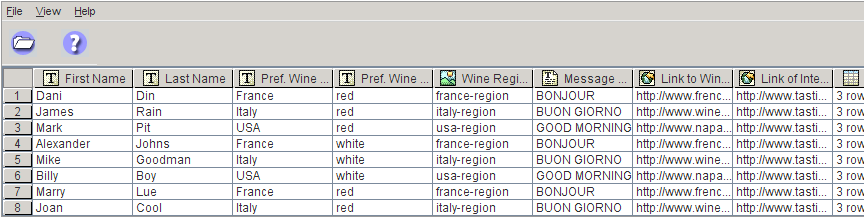
For information on creating proof sets and viewing dynamic content using proof sets, see Creating a Proof Set.
Content samples and input data samples
Content/input data samples are a set of possible values, defined by the uCreate Print user for a given content object/input data field. These samples are a useful tool for proofing the design layout when you wish to check how the design handles irregular recipient values (such as unusually short or long names), or when the data source your document is linked to is unavailable.
Different content objects/input data fields can have different sets of values associated with them. There are no constraints on these values, except that they need to adhere to the type of content objects/input data field with which they are associated (for example, the content samples associated with a graphic content object should be a set of images).
For example, one can define three images - ”CarA”, “CarB”, and “CarC” - as the possible values of a “CarPicture” graphic content object. It is then possible to flip through these content samples, to see how the different images appear in the design, without being forced to rely on a complete proof set that may not necessarily be available at the early stages of the design process.
For information on viewing dynamic content using samples, see Using Content Samples and Using Input Data Samples.