
 View what's in this topic
Securing XMPie uProduce – Configuration Best Practices
Summary: This article consolidates XMPie's security guidance for a self-hosted uProduce deployment into one set of best practices, from the Windows host to the uProduce Dashboard System Settings. Each section links to the XMPie KBA or help topic with the detailed procedure.
Audience: XMPie customers, system administrators and support personnel who install, operate or audit uProduce servers.
A secure deployment rests on five layers: a dedicated, hardened Windows host; a segmented network with only the documented ports open; HTTPS everywhere behind a frontend proxy; a least-privilege SQL Server; and tight uProduce settings, data and patch management.
|
Field |
Value |
|---|---|
|
Applies to |
XMPie uProduce (PersonalEffect Print, TransMedia, StoreFlow), self-hosted, single-server and Director + Extension deployments |
|
Related products |
uStore, XMPL, Circle Agent, uCreate Print connectivity |
|
Audience |
System administrators, IT security, XMPie implementers and support engineers |
|
Responsibility |
XMPie secures the software and releases patches; the customer secures the infrastructure, network, OS, database and operations |
Golden rule: servers running XMPie software must be dedicated to XMPie only. XMPie does not take responsibility for issues caused by other installed applications (Security Headers Hardening).
Architecture and attack surface
The attack surface of uProduce is its web tier (Dashboard, APIs, connectivity), its inter-server messaging, and the SQL Server and file storage holding recipient data. Segment them into zones so only the frontend proxy faces users.
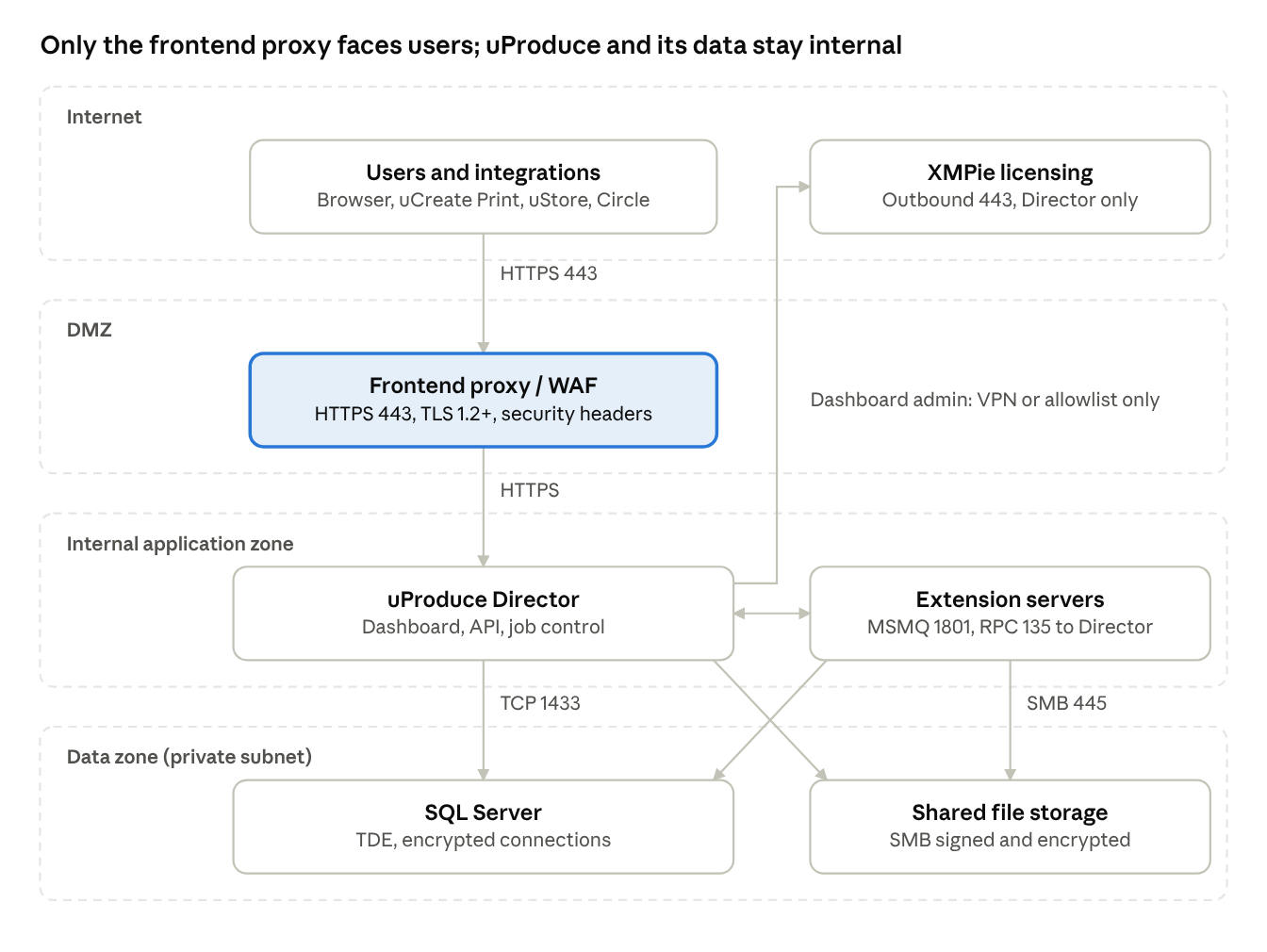
Recommended uProduce security zones and traffic paths
Every uProduce server (Director and Extensions) reaches both SQL Server on 1433 and shared storage on 445; the Director alone calls out to XMPie licensing. Nothing in the application or data zones is reachable from the internet.
Server and OS hardening
Build every uProduce server (Director and Extensions) from a hardened Windows Server baseline and keep it dedicated to XMPie.
-
Hardened baseline. Start from a CIS-benchmarked Windows Server image rather than a default install, using a Windows Server version listed in the uProduce Customer Expectation Document for your release.
-
Dedicated server. Install only XMPie software and its prerequisites (IIS, .NET, MSMQ, SQL client, InDesign Server where licensed). No other web apps, file shares or tools.
-
Minimize roles and features. Remove unused Windows roles, features and services. Uninstall SMB v1.
-
Separate partitions. Keep the OS on C: and XMPie applications and job storage on D:, as XMPie's sizing guidance specifies, so job data never fills or mixes with system files.
-
Dedicated service account. Run XMPie services and IIS application pools under a dedicated account with only the rights in the uProduce installation guide. Never share it with other apps, never make it Domain Admin, deny interactive logon where possible, and use a long, managed password.
-
Endpoint protection. Run anti-malware / EDR on every server. Exclude only the folders XMPie lists (see Antivirus exclusions below), check that no XMPie service is quarantined, and review exclusions after upgrades.
-
NTFS permissions. Restrict job, asset and upload folders to the service account and administrators. Deny execute on folders that only hold uploaded content.
-
Local admins. Limit the local Administrators group to named admin accounts. Rename or disable the built-in Administrator and use LAPS or equivalent for local passwords.
-
Remote access. Allow RDP only from a jump host or VPN, require Network Level Authentication, and never expose RDP (3389) to the internet.
Antivirus exclusions
XMPie recommends excluding only these folders from background scanning, to protect performance and avoid production failures (Excluding folders from antivirus scanning on PersonalEffect servers). $ is the drive XMPie is installed on; XMPie Support's ServerInfo utility confirms the exact paths.
|
Folder |
Contents |
|---|---|
|
$:\XMPie\XMPieOutput, XMPieTempOutput, XMPieTempStorage |
Job output and temporary files |
|
$:\XMPie\XMPieData*, XMPieAssets*, TempUpload* |
Campaign data, assets and uploads |
|
$:\XMPLogs\ |
XMPie logs |
|
$:\Users\<username>\AppData\Local\XMPie\ and $:\Users\<username>\AppData\Local\Temp\ |
XMPie user cache and temp for the service account |
|
%systemroot%\System32\MSMQ\ |
MSMQ queues; spell out the full path, as some antivirus products ignore the variable |
Network and transport security
Expose uProduce to users only over HTTPS through a frontend proxy or WAF, and open only the inter-server ports XMPie documents.
Topology
-
Frontend + backend. XMPie recommends a frontend (reverse proxy) in front of the uProduce backend. Put the proxy or WAF in the DMZ; keep the Director, Extensions, SQL Server and file storage on internal subnets with no direct internet route.
-
Restrict admin surfaces. Reach the uProduce Dashboard and uProduce API / web services only from trusted networks (internal, VPN or IP allowlist). Where customers must reach the Dashboard from the internet, apply the controls in Internet-facing Dashboard below.
-
Origin lock-down. If a WAF is used, configure the backend to accept web traffic only from the WAF so it cannot be bypassed.
Internet-facing Dashboard
If customers need to use the uProduce Dashboard from the internet, publish it only through the frontend layer and add compensating controls. The safest option is still a VPN or an identity-aware access gateway, so users authenticate with MFA before the Dashboard is reachable at all.
-
Frontend only. Publish the Dashboard URL through the frontend proxy / WAF in the DMZ. Lock the backend so it accepts web traffic only from that proxy, and apply the security-header package there (Security Headers Hardening).
-
WAF. Use a WAF that inspects the full request including the body, keep managed rules updated, and rate-limit the login page (Securing a Self-Hosted uStore Deployment).
-
Expose only what is needed. Publish the Dashboard only. Keep uProduce REST and Web Service APIs internal unless an integration needs them, and then allow only that integration's source IPs.
-
HTTPS enforced. Public-CA certificate, TLS 1.2+, HSTS on the proxy, and ForceSecureConnection set to true.
-
MFA. uProduce does not enforce MFA itself, so require it at the access gateway or SSO layer. On domain-joined servers, use LDAP authentication so domain lockout and expiry apply.
-
Customer accounts. One named, non-admin user per customer person, granted only that customer's uProduce account. Set AllowNonAdminShareWithOtherUsers and AllowNonAdminSetAllAccountsPermissions to false so customers cannot widen their own access.
-
Admins stay internal. Administrators sign in only over VPN or the internal network; alert on any admin login from an external IP.
-
Session and errors. Strong-password regex, login token of 30 minutes or less, and Dashboard::ShowErrorDetails left false.
-
Verify and watch. Pen-test the published Dashboard before go-live and yearly, forward proxy and IIS logs to the SIEM, and alert on repeated failed logins and unusual locations.
-
Patch fast. An internet-facing Dashboard raises the urgency of every XMPie, IIS and Windows security update.
HTTPS and TLS
-
Install a valid certificate from a public CA on the uProduce server and bind it to the IIS Default Web Site. Self-signed certificates are not supported for XMPL-linked features such as PDF on Demand and password-protected PDFs.
-
In the uProduce Dashboard, under Settings, set the internal and external addresses (Global Settings / Proxy Configuration) to HTTPS URLs using the certificate's domain name.
-
Redirect HTTP (80) to HTTPS (443), and set ForceSecureConnection to true in System Settings so the Dashboard refuses plain HTTP. Keep port 80 open only if you still need HTTP for features that do not support HTTPS, such as Circle email links or PDF on Demand (Circle and GDPR).
-
Allow TLS 1.2 and 1.3 only. Disable SSL 2.0/3.0, TLS 1.0/1.1 and weak ciphers (RC4, 3DES, CBC-SHA1 suites) in Windows SCHANNEL, and enable strong crypto for .NET.
-
Use HTTPS for uCreate Print connectivity, uStore, XMPL and Circle Agent connections to uProduce.
-
Enable SSL/TLS on SMTP delivery providers that support it.
Security headers
Apply XMPie's security-header package on the frontend server (or on the backend if it is internet-facing): back up C:\inetpub\wwwroot, remove aspnet_client, iisstart.htm, iisstart.png and the default web.config, copy in XMPie's configuration files, then restart (Security Headers Hardening). Also remove the IIS Server and X-Powered-By headers.
Firewall ports
Allow only these paths between servers (Required Network Ports for uProduce Environments); block everything else by default.
|
Port |
Protocol |
From → To |
Purpose |
|---|---|---|---|
|
443 |
TCP |
Users / proxy → uProduce |
Dashboard, API, connectivity over HTTPS |
|
1433 |
TCP |
uProduce servers → SQL Server |
uProduce databases |
|
1434 |
UDP |
uProduce servers → SQL Server |
SQL Browser, only for named instances or dynamic ports |
|
445 |
TCP |
uProduce servers ↔ file storage |
SMB shared assets and output |
|
1801 |
TCP/UDP |
uProduce ↔ uProduce |
MSMQ messaging and pings |
|
135, 49152–65535 |
TCP |
uProduce ↔ uProduce |
RPC endpoint mapper and dynamic RPC |
|
53, 88, 389, 636, 464 |
TCP/UDP |
uProduce → domain controllers |
DNS, Kerberos, LDAP/LDAPS (domain-joined only) |
|
443 |
TCP |
Director → internet |
XMPie licensing; Adobe services for InDesign Server editions |
Do not open legacy NetBIOS (137–139) or legacy MSMQ ports (2101, 2103, 2105, 3527) unless a specific legacy need is confirmed. Narrow the dynamic RPC range where your environment allows.
SQL Server security
Run the uProduce databases (such as XMPDB2 and XMPDBASSETS) on a dedicated, internal SQL Server reachable only from uProduce servers, with least-privilege logins and encryption at rest and in transit.
-
Placement. Host SQL Server on a private subnet. Allow TCP 1433 only from uProduce servers (and uStore, if used). On Azure, XMPie supports SQL Server on a VM, not Azure SQL Database or Managed Instance (Deploying XMPie Server Products on Azure Cloud Computing Service).
-
Edition. Use SQL Server Standard or Enterprise in production. Express limits database size, and XMPie flags size checks as critical on Express (XMPie Server Maintenance).
-
Authentication. Prefer Windows authentication with the dedicated service account. If SQL authentication is required, disable or rename sa, use a strong unique password for the XMPie login, and grant only the database roles the installer requires.
-
Encryption at rest. Enable Transparent Data Encryption (TDE) where licensed; it needs Enterprise (or Datacenter) edition and no application changes. Back up the TDE certificate and keep it even if TDE is later disabled (Running XMPie Server Products Connected to SQL Server with Transparent Data Encryption (TDE)).
-
Encryption in transit. TDE does not encrypt connections. Enable encrypted connections in SQL Server Configuration Manager with a trusted certificate, and test uProduce connectivity after the change.
-
Surface area. Disable unused features (xp_cmdshell, OLE Automation, CLR unless required) and the SQL Browser if using a fixed port.
-
Backups. Take regular full and log backups, encrypt them, keep one copy isolated from production, and test restores. Back up before every upgrade or maintenance task.
-
Auditing. Enable SQL Server login auditing (failed and successful) and forward it to your SIEM.
Application security (uProduce Dashboard)
Inside uProduce, enforce named accounts with least privilege, a strong password policy or domain authentication, and short login sessions. Global Settings are under Settings > Global Settings and need the admin user (Global Settings help).
Accounts and authentication
-
Protect the built-in admin. Change the default admin password at installation to a long, unique value stored in a password vault. Use it only for administration, never for daily production or integrations.
-
Named users only. Give every operator, designer and integration its own uProduce user. Never share credentials.
-
Domain / LDAP authentication (uProduce 13.2 and later). On domain-joined servers, create users with Windows domain or LDAP authentication so password complexity, expiry and lockout come from your domain controller. This then applies across the Dashboard, uProduce APIs, uCreate Print connectivity and Circle. Use LDAPS (636) where possible.
-
Integration accounts. Create separate users for uStore, Circle and custom API integrations, scoped to the accounts they need, and rotate their passwords on a schedule.
-
MFA. uProduce does not enforce MFA itself; require it at the network layer (VPN or SSO gateway) for anyone reaching the Dashboard remotely.
Global Settings to configure
|
Setting |
Recommended value |
Why |
|---|---|---|
|
Strong Password Settings (regex) |
At least 12 characters with upper, lower, digit and symbol, e.g. ^(?=.*[a-z])(?=.*[A-Z])(?=.*\d)(?=.*[^\w\s]).{12,}$, plus a clear error message |
Blocks weak passwords for locally authenticated users |
|
Login token validity duration (minutes) |
30–60 for interactive users |
Logs out idle sessions automatically |
|
Monitor Settings |
Admin only |
Hides server, service and database details from non-admins |
|
System alert emails |
Send to a monitored admin mailbox |
Surfaces stopped services and low disk or database space |
System Settings to configure
System Settings (system admin only) hold the Dashboard's security switches (System Settings help). Set the first group away from its default; confirm the rest still hold their secure default after every upgrade.
|
Setting |
Default |
Recommended |
Why |
|---|---|---|---|
|
ForceSecureConnection |
false |
true |
Requires HTTPS for the Dashboard |
|
ForceQLingoLimitations |
false |
true, unless campaigns need QLingo extension functions or fetch |
Blocks QLingo extension functions and fetch, which pulls data from the internet |
|
ForceQLingoQueriesLimitations |
false |
true, unless plans need full query syntax |
Blocks full-syntax queries that allow arbitrary SQL such as stored procedure calls; plan-embedded and uProduce-generated queries still run |
|
DisableInDesignScripting |
false |
true, if no workflow uses InDesign scripting |
Removes scripting as a code-execution path on the server |
|
AllowNonAdminShareWithOtherUsers |
true |
false, if sharing should be admin-controlled |
Stops non-admins sharing accounts and reports with other users |
|
SecureAssetURLs |
true |
true |
Serves personalized assets through the authenticated REST API with signed URLs instead of open links into XMPieAssets; turn off only if an integration cannot follow REST asset URLs. Signed URLs do not expire |
|
RequireRequesterPasswordForSecuredActions |
true |
true |
Re-prompts for the user's password on sensitive actions such as password changes |
|
AllowNonAdminManageAccountLevelEntities |
false |
false |
Keeps delivery providers and post composition operations admin-managed |
|
AllowNonAdminSetAllAccountsPermissions |
false |
false |
Stops non-admins making their items available in all accounts |
|
AllowNoneStrictImpersonationStrategy |
false |
false |
Stops admins impersonating admins at the same level |
|
Dashboard::ShowErrorDetails |
false |
false |
Hides technical error details; enable only while troubleshooting |
|
Dashboard::ShowVerifiedEmailsAdminOnly |
true |
true |
Limits the verified email sender list to admins |
|
ClaudeApiSettings, eSignSettings |
JSON |
Change only with XMPie Support |
Hold API keys and client secrets; restrict System Settings access and rotate these secrets if exposed |
Roles and permissions
-
Grant users only the uProduce accounts and campaigns they work on, with the lowest role that fits.
-
Keep account-level entities (delivery providers, etc.) admin-managed: leave AllowNonAdminManageAccountLevelEntities set to false (Delivery Provider help).
-
Assign delivery providers only to the uProduce accounts that need them, instead of the default of all accounts.
-
Review users and permissions quarterly; disable leavers on the day they leave.
API and integrations
-
Call uProduce APIs over HTTPS only, from allowlisted integration servers.
-
Store API credentials in a secrets vault or protected configuration, never in scripts or source control.
-
Treat all data and file names sent to uProduce from external systems as untrusted, and validate them in your integration code.
-
In Circle, connect only the subscriptions that need uProduce access; uninstalling the Circle Agent cuts all Circle-to-uProduce traffic (XMPie Circle Security).
Data protection and retention
Keep recipient data (PII) in uProduce only as long as production needs it, by enabling uProduce's GDPR automatic deletion and locking down job and asset storage.
Enable automatic deletion
In Settings > GDPR (system admin only) (Configuring GDPR Settings):
-
Enable deletion of jobs older than a set number of days. This removes completed, failed and aborted jobs, their outputs and temporary storage (GDPR Guidelines for XMPie Products).
-
Choose whether jobs with on-demand links are kept. This option also stops email jobs from persisting ADOR data (GDPR Settings).
-
Enable deletion of data sources older than a set number of days. Permanent data sources are kept.
-
Set retention periods to match your data-protection policy and contracts; 30 days is XMPie's historical default.
Manage data source retention
-
When GDPR is enabled, new local data sources are non-permanent and existing ones stay permanent. Review existing data sources and switch PII lists to non-permanent (GDPR in uProduce).
-
Mark a data source permanent only when it holds no PII or must outlive the retention period, such as reference or template data.
-
Delete replaced data sources when uploading a new version, and never copy recipient lists between uProduce accounts (Circle and GDPR).
-
Note that uStore marks data sources used by saved product print and proof jobs as permanent, and Circle data sources are permanent by default; handle their deletion through uStore and Circle.
-
Remote data sources (your own SQL Server or other databases) are outside uProduce's deletion; secure and purge them under your own policy, and use dedicated read-only database logins for uProduce connections.
Storage and files
-
Restrict NTFS and share permissions on job, asset and output folders (and shared storage reached over SMB 445) to the XMPie service account and administrators.
-
Require SMB signing and SMB 3 encryption between uProduce servers and shared storage.
-
Encrypt data volumes at rest with BitLocker or your storage platform's encryption.
-
Deliver outputs to printers, FTP/SFTP or hot folders over secured channels; prefer SFTP over plain FTP.
-
Use test data with fake personal details for design, proofing and training.
Patching, monitoring and logging
Stay on a supported uProduce version, apply XMPie and Microsoft security updates promptly, and send logs and alerts to people who act on them.
Patching
-
Supported version. Run a uProduce release still covered by the XMPie Standard Support Policy; plan upgrades before end of support.
-
XMPie security updates. Subscribe to XMPie information-security notifications on the XMPie Trust Centre and check the Knowledge Base for advisories. For example, Security Vulnerability Impact Assessments lists XMPie's assessment of publicly announced vulnerabilities, such as PHP2Shell and Node2Shell.
-
Microsoft and third-party updates. Patch Windows, IIS, .NET, SQL Server and InDesign Server monthly. Keep the same Windows Update settings and patch level on all servers in a multi-server site (XMPie Server Maintenance).
-
Change control. Back up SQL Server and the XMPie folders, then test patches and upgrades on a staging server before production.
-
Vulnerability scanning. Scan servers regularly and run a penetration test at least yearly or after major changes.
Monitoring
-
Use the uProduce monitoring tools (disk space, database size, services) and set system-alert emails in Global Settings. They warn when 25% of database size remains and email the admin when an XMPie service stops (Monitoring uProduce).
-
Alert on failed and unusual logins, new admin users, changes to Global Settings, and service-account activity outside production hours.
Logging
-
Enable IIS logging with W3C extended fields (client IP, user, status, time taken). If behind a proxy, log the original client IP (X-Forwarded-For).
-
Enable Windows security auditing (logon, account management, policy change) and SQL Server login auditing.
-
Forward IIS, Windows, SQL Server and XMPie logs to a central SIEM and retain them for at least 90 days. XMPie logs are under C:\XMPLogs; REST API and Web Service API logs are in C:\XMPLogs\W3WP.
-
Use advanced logging only for troubleshooting. It is enabled per server by the SeverityMask registry value under HKLM\SOFTWARE\WOW6432Node\XMPie\XMPie uProduce Server Object\1.00.000\, writes to the C: drive and can grow quickly, so disable it as soon as the investigation ends (Enabling Advanced Logging in uProduce).
Backup and recovery
-
Back up SQL Server databases, XMPie job/asset storage and configuration on a schedule that meets your RPO and RTO.
-
Keep one copy offline or immutable to protect against ransomware, and test restores at least quarterly (XMPie Server Products - Disaster Recovery).
Security checklist
Use this checklist at installation, after upgrades and in each quarterly review.
Server and OS
☐Servers built from a hardened (CIS) Windows baseline and dedicated to XMPie only
☐Unused roles, features and SMB v1 removed
☐Dedicated, non-Domain-Admin service account with a managed password
☐EDR / anti-malware running; exclusions limited to XMPie's documented list
☐RDP reachable only via VPN or jump host
Network and transport
☐Frontend proxy or WAF in front of uProduce; Dashboard not internet-facing, or published with all Internet-facing Dashboard controls
☐Public-CA certificate bound in IIS; internal and external addresses set to HTTPS
☐TLS 1.2+ only; legacy protocols and weak ciphers disabled
☐XMPie security-header package applied (Security Headers Hardening)
☐Firewalls allow only the ports in Required Network Ports for uProduce Environments; default deny
SQL Server
☐SQL Server on a private subnet; 1433 open only to uProduce servers
☐Windows authentication or strong SQL login; sa disabled
☐TDE enabled (if Enterprise) and certificate backed up
☐Encrypted connections enabled
☐Encrypted backups with restore tested
uProduce application
☐Default admin password changed and vaulted
☐Named users only; separate integration accounts
☐Domain/LDAP authentication or strong-password regex configured
☐Login token validity set to 30–60 minutes; System Settings hardened (ForceSecureConnection, QLingo limits, InDesign scripting, SecureAssetURLs)
☐Monitoring visible to admins only; alert emails configured
☐User and permission review completed this quarter
Data protection
☐GDPR automatic deletion of jobs and data sources enabled
☐PII data sources set to non-permanent
☐Job, asset and output folders restricted; volumes encrypted
Operations
☐uProduce version within XMPie support; latest security updates applied
☐Windows, SQL Server, IIS and .NET patched this month
☐Logs forwarded to SIEM and retained 90+ days
☐Offline/immutable backup copy exists and restore tested this quarter
Related articles
This article builds on the following XMPie Knowledge Base articles and help topics (checked November 2026). Follow them for full procedures.
-
Excluding folders from antivirus scanning on PersonalEffect servers – Antivirus exclusions
-
XMPie Server Maintenance – SQL edition, consistent patching
-
XMPie Circle Security – Circle Agent access
-
Running XMPie Server Products Connected to SQL Server with Transparent Data Encryption (TDE) – Encryption at rest
-
XMPie Server Products - Disaster Recovery – Backup and recovery
-
GDPR Guidelines for XMPie Products – Data retention and deletion
-
Deploying XMPie Server Products on Azure Cloud Computing Service – Supported SQL Server hosting
-
XMPie Standard Support Policy – Supported versions
-
Security Headers Hardening – Frontend security headers
-
Enabling Advanced Logging in uProduce – Logging
-
Required Network Ports for uProduce Environments – Firewall rules
-
Securing a Self-Hosted uStore Deployment – Shared responsibility and infrastructure model
-
Security Vulnerability Impact Assessments – XMPie's assessment of publicly announced vulnerabilities
-
XMPie Trust Centre – Security notifications and vulnerability reporting
The recommendations in this article are general guidance for self-hosted deployments and do not modify the terms of your XMPie Software License and Services Agreement.